





How Atlanta Small Businesses Can Start Using Edge AI Today (for the Atlanta Small Business Incubator)
by Grant Winrich

what is edge ai and why is it critical for next generation iot

For small businesses in Atlanta, the pressure is familiar: customers expect faster service and tighter accuracy while labor, shrink, and operating costs keep rising. At the same time, business technology trends are pushing AI from a “someday” project into a near-term expectation, and many owners and operations leaders worry adoption means a disruptive rebuild or handing sensitive data to distant systems. Edge AI offers a more workable starting point by bringing intelligence closer to where work actually happens, in ways that fit real-world constraints. The payoff is a clearer line from practical AI adoption to measurable operational control.
Understanding Edge AI in Plain Terms
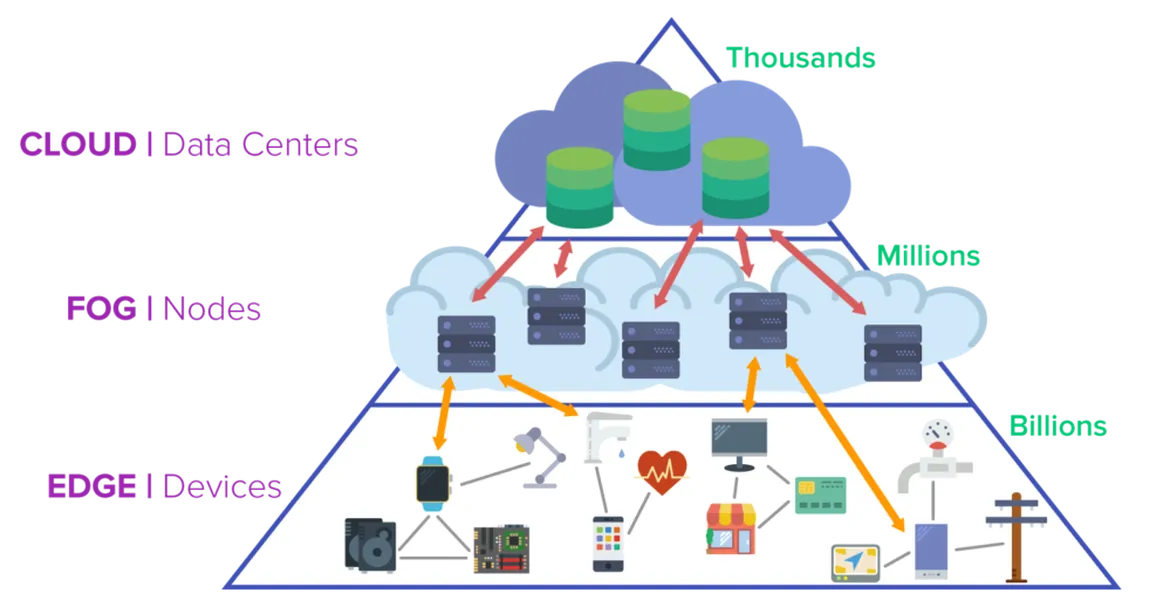
https assets.v3.snowfirehub.com images 120985 51 710
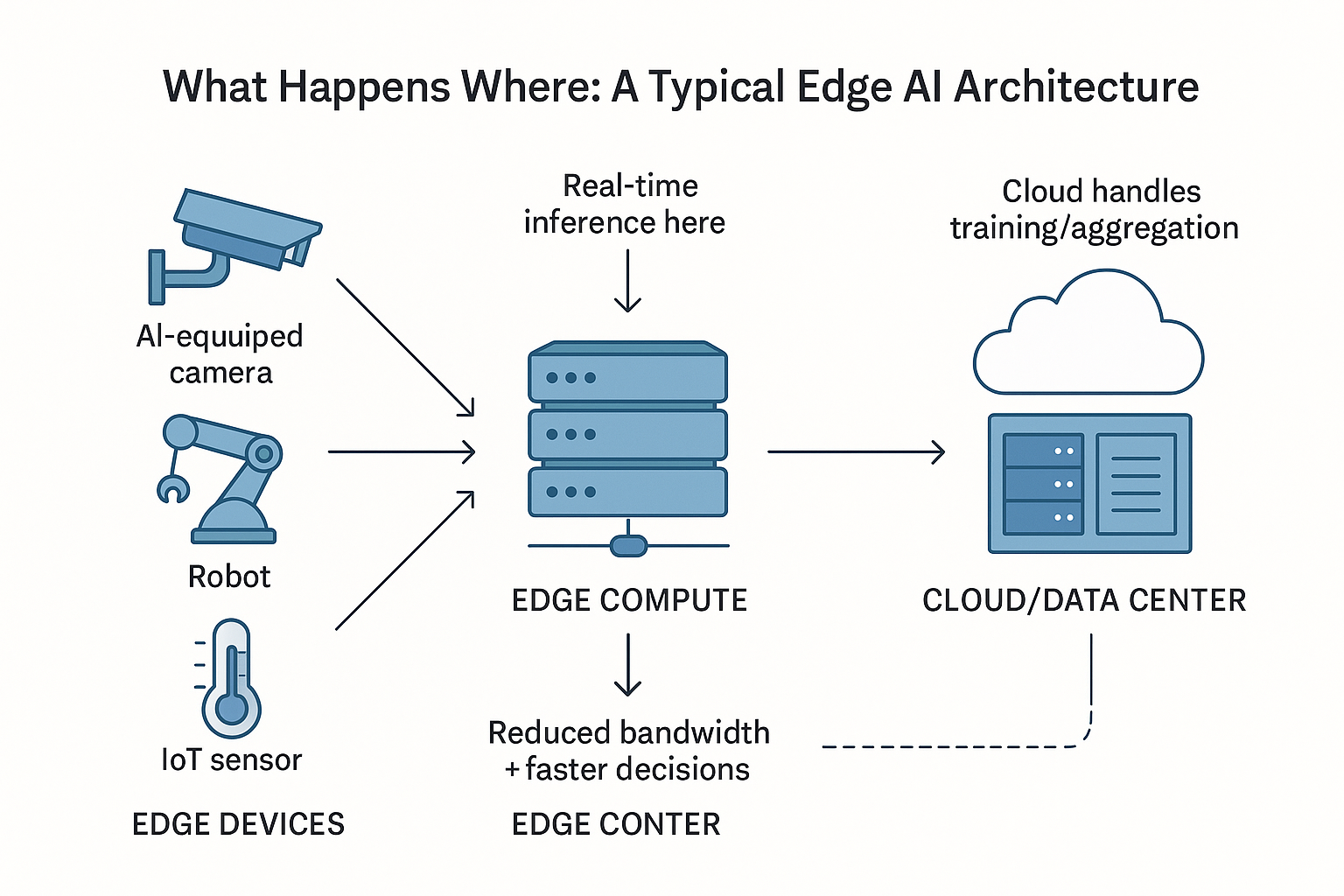
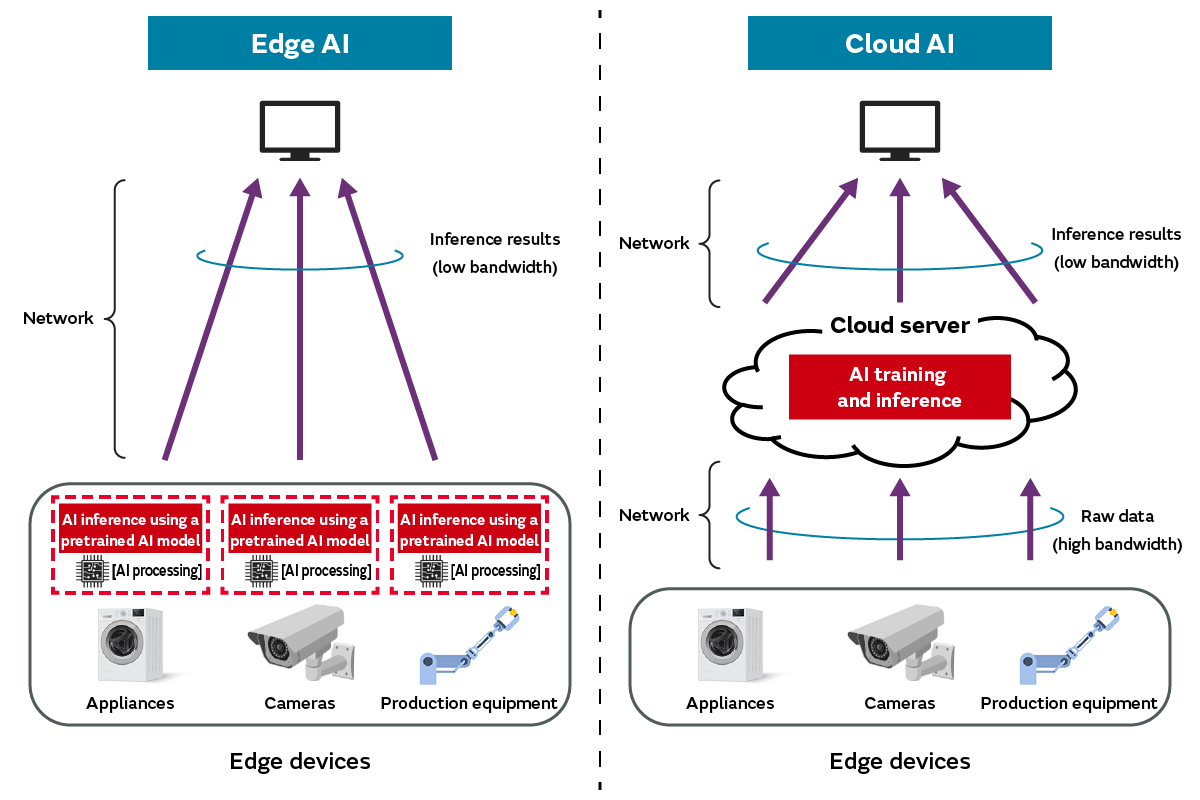
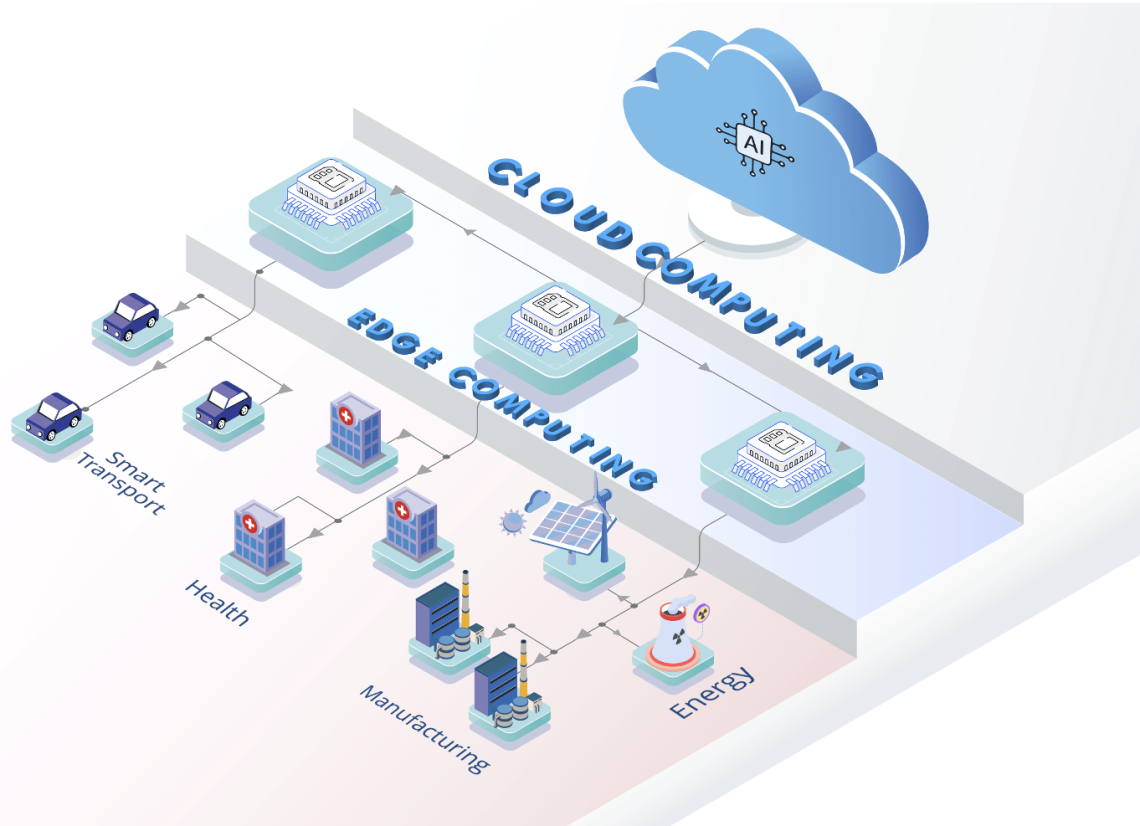
Edge AI means the AI runs on or near the devices generating data, like cameras, sensors, vehicles, or your POS, instead of sending everything to the cloud. That local setup relies on processing data locally so the system can decide and respond where work happens.
This matters because local decisions cut waiting time, keep sensitive data on-site, and reduce what you pay to transmit and store. It also stays useful during internet slowdowns, which can improve day-to-day reliability. When teams use unapproved tools, Shadow AI tools can leak confidential data, and edge setups can limit exposure.
Think of it like a checkout lane that can verify items, flag likely fraud, and spot scan errors without calling headquarters first. Or a delivery van that detects risky driving in real time, even with spotty reception.
7 Atlanta-Ready Edge AI Use Cases You Can Map to Operations
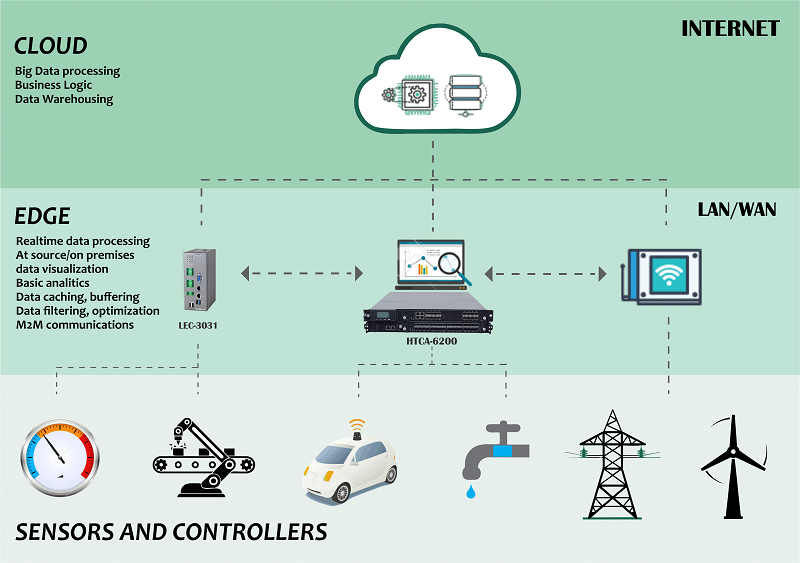
cloud to edge
Edge AI is easiest to adopt when you start with one workflow where seconds matter, privacy matters, or connectivity is inconsistent, then run AI where the data is created (camera, machine, vehicle, or in-store device). Use the menu below to pick a use case that fits your operations and budget, with clear inputs, inference locations, and real-time actions.
- Detect inventory shrink at the shelf (not after the count): Capture video from one high-loss aisle camera plus POS “void/refund” events. Run inference on a small on-site box near the camera (or on the camera if supported) so alerts don’t depend on the internet. Trigger a real-time action like a quiet manager notification when the system flags “concealment + exit direction” patterns, then review clips weekly to tune false positives and document preventable loss.
- Spot checkout friction and line buildup in real time: Capture overhead camera counts (heads/shoulders only) and register status signals (open/closed, transaction time). Run inference at the store edge to keep latency low and avoid sending identifiable footage to the cloud. Trigger actions like “open register 3,” “deploy floating associate,” or “switch one lane to returns” when queue length or dwell time crosses a threshold you set from last month’s peak hours.
- Start equipment condition monitoring with “cheap” signals first: Capture vibration, temperature, and run-time hours from a single critical asset (HVAC, compressor, conveyor, or refrigeration). Run inference on a local gateway mounted in the mechanical room so you can keep processing even during outages. Trigger a work order when the model detects an anomaly trend, and tie it to a simple maintenance rule like “inspect within 48 hours” to avoid emergency callout premiums.
- Improve driver and vehicle safety with edge-assisted telematics: Capture accelerometer/gyroscope events (hard braking, sharp turns), optional dashcam clips, and GPS breadcrumbs. Run inference on the device in the vehicle so only “event summaries” upload, cutting data costs and privacy exposure. Trigger coaching actions such as a weekly scorecard and same-day alerts for repeated harsh events on a route.
- Use computer vision for receiving and picking accuracy: Capture short video at the receiving table or packing station plus barcode scans. Run inference on a small workstation GPU or edge server in the back room to support fast “is this the right item/quantity?” checks. Trigger a stop-and-confirm prompt when the system sees a mismatch between the expected SKU and what’s physically present, reducing returns and re-shipments.
- Deploy smart agriculture monitoring for small plots and greenhouses: Capture soil moisture, ambient temperature/humidity, and plant images from a few fixed cameras or phones. Run inference on a local gateway on-site so watering decisions keep working when connectivity is spotty. Budget-friendly AI can be surprisingly accessible; examples in the market include pricing under USD 0.10 per hectare per season for certain pre-trained models, making it realistic to test targeted irrigation triggers before expanding.
- Add wearable AI for hands-free quality and safety checks: Capture motion, location, and optional first-person video from wearables used by supervisors or trainers. Run inference on-device for immediate prompts, especially useful for safety compliance or step-by-step task verification. A clear wearable AI definition is “AI integrated into wearable devices” that analyze movements and surroundings in real time; translate that into one checklist workflow, then measure fewer reworks or incidents.
Start Your First Edge AI Pilot in 5 Steps
edge ai computing how it works (1)
This path helps you go from “we have an idea” to a working edge AI pilot that saves time or money, without rebuilding your whole tech stack. For Atlanta small businesses, the payoff is faster decisions on the floor, steadier operations during spotty connectivity, and tighter control over sensitive data.
- Choose one workflow with a clear trigger
Start with a single moment where an automated decision is obviously useful, such as “alert a manager,” “open another register,” or “create a maintenance ticket.” Keep scope tight by choosing one location, one device type, and one measurable outcome so you can learn quickly without disrupting daily operations.
- Decide where the compute should run
Choose on-device or on-prem edge processing when you need low delay, must keep video or sensor data local, or expect internet dropouts. Choose cloud processing when speed is less critical and you mainly need centralized reporting, then set a fallback rule for what happens if connectivity fails.
- Define KPIs and a 2 to 4 week pilot budget
Pick 2 to 3 KPIs that connect to dollars, such as fewer stockouts, reduced shrink incidents, shorter wait times, or fewer emergency service calls. A market signal like how the edge AI market has grown is a clear reminder to treat your pilot like a small, time-boxed investment: cap spending, document results, and only expand when the numbers earn it.
- Run the pilot and tune for false alarms
Deploy to one camera, one asset, or one route and track every alert as “useful” or “noise” so you can adjust thresholds and retrain rules. Review results weekly with the people who receive the notifications, because they will tell you what is actionable and what gets ignored.
- Scale, then upgrade hardware only when performance demands it
Roll out to additional lanes, aisles, assets, or vehicles once your KPIs hold steady and your team trusts the alerts. Move up to higher-performance edge or on-prem hardware when you add multiple cameras, increase frame rates, or run GPU-heavy models that create lag, since growth trends like the USD 8.91 billion by 2030 projection often show up first as more software features and heavier inference workloads, including options like the Axial AX300.
Edge AI FAQs: Security, Cost, and Operations
img 0001 en
Q: What happens if our internet goes down during edge AI processing?
A: Many setups keep making local decisions even when connectivity drops, then sync summaries later. Write a simple “offline rule” for what the device should do, like store events locally, keep the last good model, and alert staff via on-site notifications. Test outages during your pilot so behavior is predictable.
Q: How do we reduce security risks with edge AI cameras or sensors?
A: Treat edge devices like mini servers: change default passwords, patch regularly, and isolate them on a separate network VLAN. Encrypt data at rest and in transit, and restrict admin access to named accounts with multi-factor authentication. Start with a minimal data footprint so there is less to protect.
Q: Can edge AI help with data privacy compliance if we handle sensitive footage?
A: Yes, because edge AI computing can keep raw video on-site and only send anonymized counts or alerts to the cloud. Add retention limits, role-based access, and a written policy for who can view footage and why. When in doubt, confirm requirements with your legal or compliance advisor.
Q: How much does it cost to start, and how do we keep it from ballooning?
A: Start with one workflow, one device, and a short timeline, then cap spend on hardware, setup, and support hours. Budget for ongoing items like replacements, updates, and monitoring, not just the first install. Expect costs to rise mainly when you add more streams, higher resolution, or faster response needs.
Q: Should we expect a lot of maintenance or specialized staff time?
A: Routine upkeep is manageable if you plan for it: monthly patching, basic health checks, and a process for recalibrating when conditions change. Use “model drift” triggers such as rising false alarms to decide when to retrain or adjust thresholds. If you containerize deployments, reducing latency and simplifying rollouts can also make updates more repeatable.
Run a 30-Day Edge AI Pilot to Prove Value Fast
screenshot 2024 02 06 at 19.11.33
It’s easy to get stuck waiting for perfect data, perfect security, and a perfect budget while competitors quietly improve operations. The practical path is small-scale AI experimentation: choose one workflow, run edge AI pilot projects with clear guardrails, and treat results as inputs for iterative technology deployment. Done well, this approach turns business innovation strategies into measurable AI outcomes, cost, speed, error reduction, or customer experience improvements, without betting the farm. Momentum comes from one measured pilot, not endless planning. Commit to a 30-day test with one owner, one metric, and a simple baseline so you can compare results honestly and decide what to scale. That discipline builds resilient operations and steady growth in a market that rewards speed and consistency.

Atlanta Small Business Incubator


0 Comments